%201%20(1).png)
Must-Know Secrets for SEO & Performance Optimization in Framer!

We all know that Framer is a popular visual design and development platform that has gone a step further by offering a no-code solution that is not only aesthetically pleasing, but also fully optimized for SEO and performance. This has made the Framer platform highly popular among everyone, not just developers — even non-IT users can use it to create websites according to their business needs. Creative people may be skilled at creating websites that look great and aesthetically pleasing, but not everyone knows how to optimize them. If you're one of them, you've probably thought:
“The design already looks great, but why is it loading so slowly?”
Or,
“How can I make it appear at the top of Google search results?”
Well, this is where we’ll discuss in detail how to address your worries so that your Framer website can be optimized for both SEO and performance.
The Importance of Website SEO and Performance
In today’s increasingly digital era, SEO (Search Engine Optimization) plays a major role in helping your business website grow. By optimizing your website’s SEO and performance, you can appear higher in Google search results, making your website easier to find and helping you attract more visitors — organically, meaning for free!
Visitors who come from search results are usually already looking for a product or service like the one you offer. This means they already have some initial interest. Once leads are collected and they become aware of your brand, in marketing terms, they are at the TOFU (Top of Funnel) stage — potential customers who can then be guided to the next stages: MOFU (Middle of Funnel) and BOFU (Bottom of Funnel). That’s why SEO is such an effective tool for attracting high-quality prospects.
One of the great benefits of SEO is its ability to make your business look more credible and trustworthy. Websites that appear on the first page of Google are generally perceived as more trustworthy by people. Naturally, this can greatly help build your brand’s reputation.
On top of that, SEO is also relatively cost-effective while delivering outstanding results. That’s why many businesses today rely on SEO as a core strategy for continuous growth — not just now, but also in the long term.
So, how do you improve Performance and SEO on your Framer website?
Don’t worry, Framer is actually designed to be SEO-friendly right out of the box. So, you don’t have to set everything up from scratch. Important things like sitemap.xml and robots.txt are already generated automatically, making it easier for Google to discover your website.
But if you want to further boost your SEO performance, Framer also provides the tools you need to manage everything manually. So, you still have plenty of flexibility. The good news is, you don’t need to be a web programming expert to optimize SEO and Performance in Framer. Here are some tips that can really help improve your website’s Performance and SEO:
Step 01: Use Semantic HTML
Choosing the right text and elements on your web page actually has a significant impact! Not only does it make the layout cleaner and easier to read, but it also provides additional value for your SEO performance on Google and other search engines. One important thing that is often overlooked is using the correct heading structure.
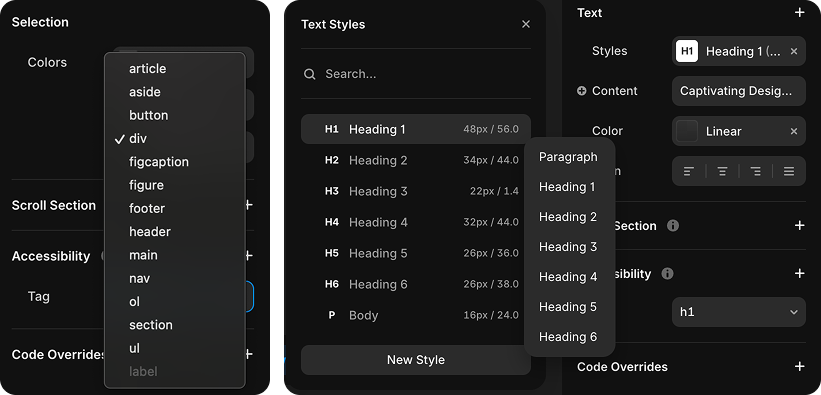
For example, using the <h1> tag for the main title is extremely important. It not only helps visitors immediately understand the main point of your content, but also serves as a strong signal to Google about the primary topic of the page. So don’t just use large text randomly — make sure the tag is appropriate as well.
In addition, if you use semantic elements such as <header>, <section>, <article>, and even <figcaption> for image captions, they can greatly help organize your HTML structure more clearly. This makes it easier for search engines to "read" your page content and index it more efficiently.
If you're using Framer, don’t worry — changing an element’s tag is very easy. Check the image below, where you’ll see how to change the tag directly from Framer’s panel:
🔎 Practical Tips:
Make sure each web page has only one <h1> element that reflects the main topic or focus of the content. After that, use the next heading levels, such as <h2>, <h3>, and so on, hierarchically to divide and organize subtopics. This makes it easier for both users and search engines to navigate and understand the overall content of your page.
Step 02: Add Alt Tags to Every Image
Using alt text for images is actually a simple but highly effective SEO trick. Alt text (short for alternative text) is a written description of an image you add to your website. Its purpose is not only to help search engines, but also to assist people who use screen readers or have visual impairments, so they can still understand what the image contains.
From an SEO perspective, alt text also plays an important role. Google and other search engines cannot “see” images the way we do. They rely on alt text to understand what an image contains. So, if you provide a clear description and use keywords relevant to your page's topic, your images may appear in Google Image Search results. The result? It can help increase traffic and improve your overall SEO performance.
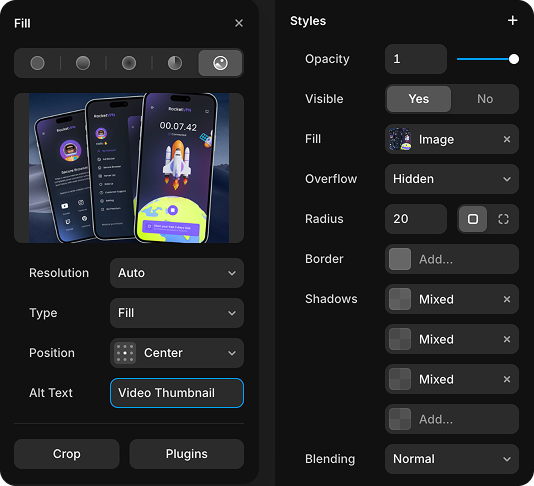
In Framer, it's super easy. Just click the image, then fill in the “Alt text” field in the right sidebar with a short but clear description. Try to describe what the image contains and relate it to your content. For example, “Video Thumbnail” is better than leaving the alt text empty.
The bottom line is, Alt text may seem like a small detail, but it can make a big difference. It helps make your website more accessible to everyone, and as a bonus, your SEO gets a boost too!
Step 03: Improve Page Speed Score
Page loading speed isn't just a technical matter — it's one of the most important factors that can have a major impact on your SEO performance. If your website is slow, it doesn't just frustrate visitors who don't want to wait around; it can also negatively affect your position in search results. Yep, search engines like Google tend to favor websites that load quickly because user experience is everything in their eyes.
The faster your page loads, the more likely visitors are to stick around, explore other content, or even come back later. It also helps Google and other search engine bots crawl your pages more efficiently — they like things that are simple and fast.
To improve your page speed performance, you can start with the basics. For example, make sure you're using compressed and optimized images (Use WEBP or AVIF formats to make your images lighter without compromising their quality). Then, you can make sure everything else has been properly optimized. Here are some easy steps to check it in Framer:
- Open Menu → Site Settings → Versions
- Look at your latest version and make sure it has the Optimized label
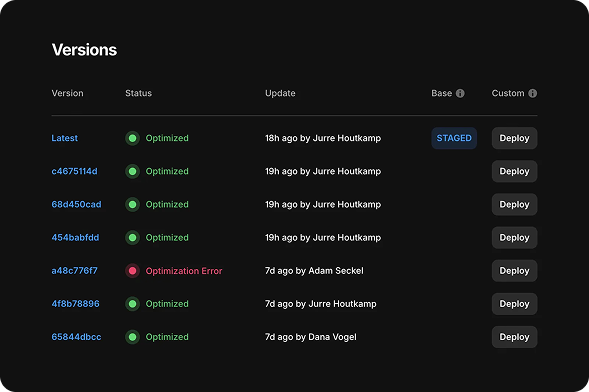
Once that's done, your site should be ready to go for maximum performance. Also, avoid using heavy web components or too many animations that can slow down loading. Basically, the lighter your page is, the better its performance will be.
If you want to know how fast (or slow) your site is right now, try checking it with these tools:
· Google PageSpeed Insights: Gives you a score and recommendations for improvements directly from Google.
· GTMetrix: Provides detailed insights into what is slowing down your site and how you can fix it.
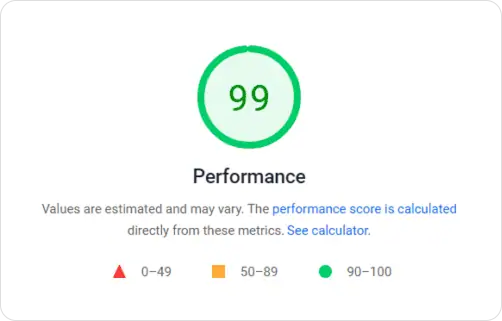
So, don't underestimate page speed — it's not just about the numbers, but about the first impression that can determine whether visitors stick around... or simply close the tab.
Step 04: Leverage CMS Detail Pages
If you have content that keeps growing, such as blogs, news articles, or documentation, it's really important to take advantage of the CMS (Content Management System) features provided by Framer. This feature makes your life much easier because you can manage a large amount of content without the hassle of creating each page manually.
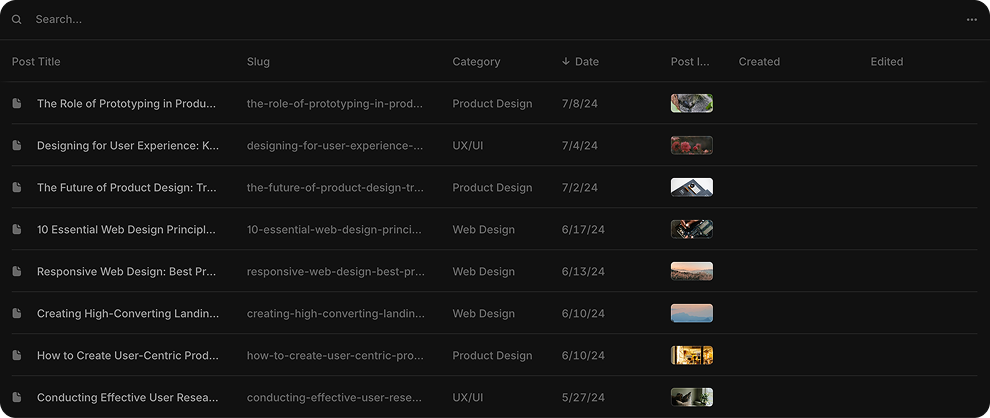
With CMS, you can automatically display a list of content, and each item in that list will have its own page that is also created automatically. Now, each of these pages can be read and understood by search engines like Google, which means the chances of your content appearing in search results become even greater. In short, you're not just creating content that is neat and well-structured, but you're also helping improve the overall visibility of your site.
Step 05: Use Redirects for Broken Links
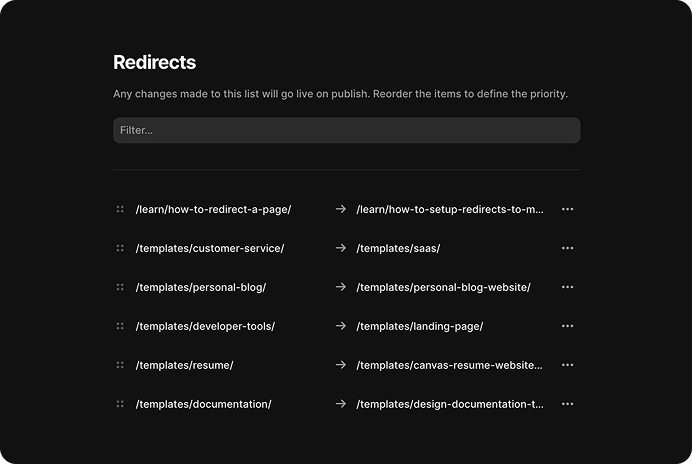
If you're redesigning your site or changing the page structure, it's really important not to leave behind old links that could send visitors to an error page. One simple but effective way to deal with this is to create a redirect from the old link to the new page. This is also really helpful for people who might type your URL with a small typo or still have old links scattered around.
Fortunately, Framer makes this process really easy. You just need to open Site Settings, then look for the Redirects section. From there, you can enter the old URL and specify which page you want it to redirect to. This way, anyone who clicks an old link will still end up where you intended without feeling lost. This doesn't just make the user experience smoother, but it also helps keep your SEO performance stable because traffic from old links doesn't simply disappear.
Step 06: Add Meta Title and Description to Each Page
To make your site more recognizable to Google and easier to find in search results, don't forget to add a meta title and meta description to every page. These are basically like a "snippet" for search engines to understand what your page is about. The title and description are also what usually appear in Google search results, so make sure you write them in an engaging and relevant way!
If you're using CMS pages like blogs, articles, or product catalogs, you can also set the meta title and description individually for each entry — so everything can be optimized as much as possible.
How to set the meta title & description in Framer:
- Open Site Settings in your project.
- Select the page you want to optimize.
- Enter the text for the Site Title (Meta Title) and Site Description (Meta Description). Try to use keywords that are relevant to the page's topic to make it more SEO-friendly.
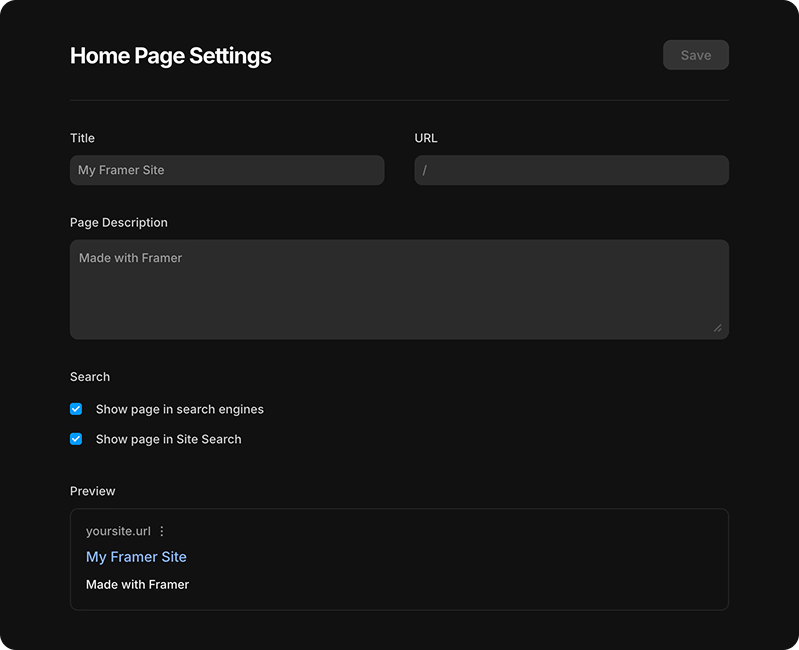
With this small step, you can help search engines better understand your site's content and, of course, increase its chances of appearing on the first page of search results!
Bonus: Integrate With Google Analytics
To find out whether your SEO strategy is working effectively or not, you can track your performance directly through Framer's built-in analytics features. Here, you can see visitor traffic data, find out where they are coming from, and analyze how well your pages are performing in search engines.
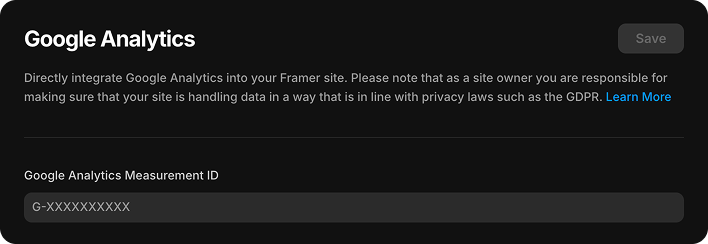
If you want deeper insights, you can also integrate Google Analytics into your Framer site. It's really easy — just enter your Analytics ID, and Framer will automatically take care of the setup.
Let's Optimize Now and See the Results!
If you've followed all six important steps plus the one bonus strategy above, there's a good chance your Framer website's SEO performance will improve significantly. It's not just about numbers or traffic, but also about how your site can appear in front of the right people at the right time. Remember, the main goal isn't just to bring visitors to your website, but also to keep them engaged, interested, and ultimately turn them into customers who generate profit.
.jpg)

Our awards & recognitions.














Ready to discuss your project with us?
Chat with Us